
Date Functions: DATE, EDATE, EOMONTH, NETWORKDAYS and More
The problem
Time runs through every business file. A dossier is submitted and a decision is expected. A batch has a shelf life. A contract starts on 31 January and reports are due every quarter. A fiscal year does not start in January. Each of these questions is about dates, and each hides a small trap: how many days really passed, what is "three months from the end of January", how many working days are left once the holidays are out.
Excel answers all of them, and the answers are reliable once you know the idea behind its dates. This article starts from that idea and then goes through the functions that cut a date into parts, build one from parts, move it by months and count working days. The examples use the companion file F13_Date_Functions.xlsx.
Dates are numbers
For Excel, a date is a serial number: the count of days since a starting point. In Excel for Windows the default system starts with 1 for 01-Jan-1900, so 02-Jan-1900 is 2, and the last date it handles, 31-Dec-9999, is 2,958,465. A time of day is the fraction of a day: 0.5 is noon, and 46293.5 would be noon on a given day.
What you see in a cell is only a format applied to that number. The Serial Numbers sheet makes it visible. The submission date of a dossier, 12-Jan-26, sits in B2 and the decision date, 28-Sep-26, in B3. Formatted as numbers, they are 46,034 and 46,293. Because they are numbers, arithmetic just works:
=B3-B2         returns 259, the days from submission to decision
=B10/7         returns 37, the same period in weeks
=B2+B5         returns 12-Apr-26, the date 90 days after submission (B5 holds 90)
If you subtract two dates and see a date instead of 259, the cell has a date format: change it to General or Number in the Home tab.
There is a curiosity behind the starting point. Excel treats 1900 as a leap year, which it was not, so it has a 29-Feb-1900 that never existed. Lotus 1-2-3 introduced the error and Microsoft kept it to stay compatible with files coming from it. Since that fictitious day sits at the very beginning of the calendar, it makes no difference to any modern date.
A date can also be a text that merely looks like one, typically after an import. A real date is aligned to the right by default, text to the left, and arithmetic on text fails. We come back to this with DATEVALUE below.
TODAY
TODAY returns the current date, and has no arguments:
=B4-TODAY()
For a shelf-life expiry in B4 it returns the days left. TODAY is a volatile function: it is recalculated every time the sheet is, so the value changes daily and a file that uses it will never look the same twice. For a report that must show a fixed date, type the date instead.
Cutting a date into parts
DAY, MONTH and YEAR extract the three components:
=DAY(A2) =MONTH(A2) =YEAR(A2)
The DAY MONTH YEAR sheet holds ten transaction dates in A2:A11 and splits them. Typical uses are a month number to feed a PivotTable or a SUMIFS, and a label that sorts correctly, because a year-month in that order stays in chronological order even as text:
=D2&"-"&TEXT(C2,"00")
returns 2026-03 for 19-Mar-26.
A fiscal calendar
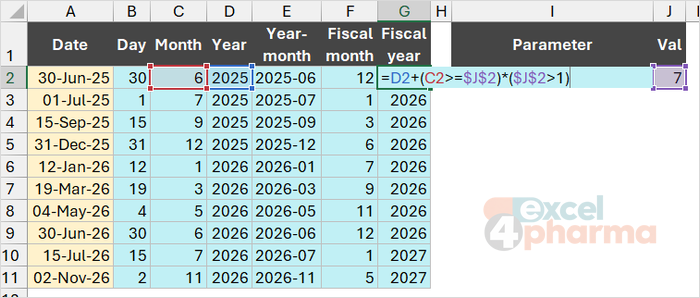
Not every company counts months from January. If the fiscal year starts in July, with the start month in J2, the fiscal month of a date is:
=MOD(C2-$J$2,12)+1
For March it gives 9, for July 1 and for June 12. The fiscal year, named by the calendar year in which it ends, is:
=D2+(C2>=$J$2)*($J$2>1)
The comparison C2>=$J$2 is TRUE from the start month onwards, which adds one year, and the second factor keeps a January start from being shifted. 30-Jun-25 belongs to fiscal year 2025, and 01-Jul-25 to 2026.
Building a date from parts
DATE does the reverse: it assembles a date from year, month and day:
=DATE(year, month, day)
It is the safe way to create a date in a formula, because it does not depend on regional settings. It also tolerates values out of range, and this is its most useful quirk. A month larger than 12 rolls into the following year, and a day larger than the month has rolls into the next month. In the DATE and DATEVALUE sheet, with the year in B2:
=DATE(B2,B3,B4)    returns 15-Mar-26   (year 2026, month 3, day 15)
=DATE(B2,B5,B4)    returns 15-Mar-27   (month 15)
=DATE(B2,B7,B6)    returns 31-Dec-26   (month 1, day 365)
Microsoft's own examples are the same idea: month 14 of 2008 becomes February 2009. A year between 0 and 1899 is added to 1900, so always enter four digits.
DATEVALUE
DATEVALUE converts a date written as text into a serial number. It reads 15-Mar-2026 as 15-Mar-26 and 2029-01-31 as 31-Jan-29. Two limits apply. The text must be a recognizable date in your regional settings: 05/06/26 means different days in different countries, and even a month name can fail, because January 31, 2029 is read with English settings but returns #VALUE! with many others. The ISO form year-month-day, such as 2029-01-31, is the safest choice for dates stored as text. And DATEVALUE only works on text: applied to a cell that already holds a real date it returns #VALUE!, as row 17 shows, where IFERROR turns the error into the message "Not text".
Adding months
Adding days is easy. Adding months is not, because months have different lengths. The question "one month after 31 January" has no obvious answer. Two approaches give two answers, and the EDATE and EOMONTH sheet compares them from a contract start of 31-Jan-27.
EDATE adds a number of months to a date:
=EDATE(start_date, months)
It returns a serial number, so format the cell as a date, and when the target month is shorter it uses the last day of that month. The alternative is to rebuild the date with DATE, increasing the month number: =DATE(YEAR($B$2),MONTH($B$2)+A6,DAY($B$2)). The results:
| Months added | EDATE | DATE(YEAR, MONTH+n, DAY) |
|---|---|---|
| 1 | 28-Feb-27 | 03-Mar-27 |
| 2 | 31-Mar-27 | 31-Mar-27 |
| 3 | 30-Apr-27 | 01-May-27 |
| 12 | 31-Jan-28 | 31-Jan-28 |
| 13 | 29-Feb-28 | 02-Mar-28 |
DATE does exactly what its arguments say: there is no 31 February, so it moves on to 3 March. For contract terms, renewals and anything described as "N months later", EDATE is usually what is meant. A non-integer number of months is truncated.

EOMONTH
EOMONTH returns the last day of the month, a given number of months away:
=EOMONTH(start_date, months)
With a start date of 15-Jan-27 in B3, a shift of 0 returns 31-Jan-27, 2 returns 31-Mar-27 and -1 returns 31-Dec-26. The first day of the month is one day after the previous month end: =EOMONTH($B$3,A13-1)+1. Month ends are the natural unit of reporting. If a rebate agreement starts on 31-Jan-27 and reports are due every three months, the cut-off dates in rows 18 to 21 come from a single formula, =EOMONTH($B$2,A18*$B$4): 30-Apr-27, 31-Jul-27, 31-Oct-27 and 31-Jan-28. If the start date is not valid, or the result would fall outside the supported range, EOMONTH returns #NUM!.
Counting working days
Between 02-Mar-26 and 30-Jun-26 there are 120 calendar days, but far fewer working days. NETWORKDAYS counts the days from Monday to Friday, with an optional list of holidays to exclude:
=NETWORKDAYS(start_date, end_date, [holidays])
Both the start and the end date count when they are working days. In the Working Days sheet the holidays are listed in D2:D7 as an illustrative calendar of one unnamed market:
=NETWORKDAYS(B2,B3)                       returns 87
=NETWORKDAYS(B2,B3,$D$2:$D$7)             returns 84
Three of the listed days fall within the period, so the count drops from 87 to 84. The holiday argument must be a range of cells (or an array of serial numbers) containing real dates; a text in the list is not a date and will not be excluded. Keep the list in a separate table of its own, maintained once a year.
Not everyone rests on Saturday and Sunday. NETWORKDAYS.INTL adds a weekend argument, a code that tells Excel which days are the weekend. Code 7 means Friday and Saturday:
=NETWORKDAYS.INTL(B2,B3,B5,$D$2:$D$7) returns 86, with B5 holding 7
The reverse question, the date after a number of working days, belongs to WORKDAY:
=WORKDAY(B2,B4,$D$2:$D$7) returns 09-Jul-26, 90 working days after 02-Mar-26

Common mistakes
- Treating a text that looks like a date as a date. If it aligns to the left, it is probably text; convert it with DATEVALUE or re-enter it.
- Reading a number such as 46293 as an error. It is a date without a date format.
- Adding 30 days for "a month". Use EDATE, or EOMONTH when month ends are what you need.
- Rebuilding a date with DATE and a month-end day, and landing in the next month.
- Entering a two-digit year in DATE. Years from 0 to 1899 are added to 1900, so 26 becomes 1926, not 2026. Always use four digits.
- Typing the holidays as text, or leaving a text or a blank-looking entry in the holiday range.
- Forgetting that TODAY changes every day, and using it in a report that must stay as it was on the day of issue.
- Typing dates in a format that another regional setting reads differently. For text dates use the ISO form 2029-01-31, and for dates in formulas use DATE.
Companion file
Illustrative data only. Not a decision tool.For further reading
- DATE function - Microsoft Support
- EDATE function - Microsoft Support
- EOMONTH function - Microsoft Support
- NETWORKDAYS function - Microsoft Support