
TREND and GROWTH: Projecting a Series in a Straight Line or a Curve
The problem
Sooner or later every analyst is asked the same question: if things continue as they have so far, where will we be in six months? The honest answer requires a model of the market, and no function replaces that. But a quick projection of the past is still useful, as a first estimate, as a sanity check on a more elaborate forecast, or simply to show what "business as usual" would look like.
Excel offers two functions for this job. TREND fits a straight line through the past values; GROWTH fits an exponential curve. They have the same syntax and very different personalities.
TREND: the best straight line
TREND uses the least squares method to find the straight line, y = mx + b, that passes as close as possible to the known points, and returns the values on that line for any new x:
=TREND(known_y's, [known_x's], [new_x's], [const])
On the Launch sheet, column A holds the month number (1 to 24) and column B the units sold in the first 18 months after a launch, in B2:B19. In C2, copied down to C25:
=TREND($B$2:$B$19,$A$2:$A$19,A2)
The known values are locked, while the new x moves with each row. For months 1 to 18 the formula returns the fitted line, which shows how well (or badly) a straight line describes the history; for months 19 to 24 it returns the projection. The known x's can also be real dates, since Excel stores dates as numbers, but a simple month index keeps the formula easier to read.
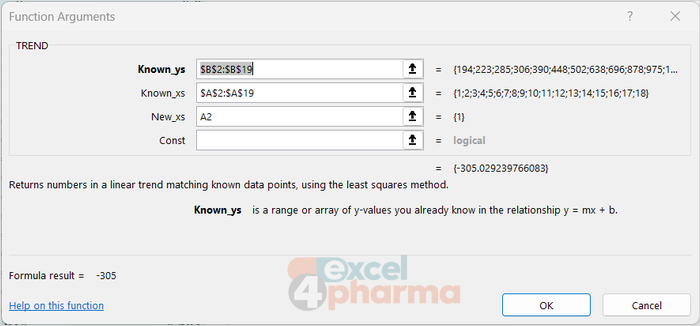
The last argument, const, is usually omitted. Set to FALSE, it forces the line through the origin, which only makes sense when zero x must mean zero y, a rare case in sales data.
For a single future value, FORECAST.LINEAR gives the same result with the arguments in a different order: =FORECAST.LINEAR(F1,$B$2:$B$19,$A$2:$A$19) returns the projected units for the month typed in F1.
GROWTH: the best exponential curve
GROWTH has exactly the same syntax, but fits the curve y = b·m^x, in which the value grows (or shrinks) by a constant percentage each period rather than by a constant amount:
=GROWTH($B$2:$B$19,$A$2:$A$19,A2)
In column D of the Launch sheet, it produces a curve that bends upwards. In the early months of a launch, when uptake accelerates, the exponential curve usually follows the data more closely than the straight line, and its projection is markedly higher.

That is exactly where the danger lies. An exponential curve assumes the growth rate stays the same forever, and no launch does that: uptake slows down as the product approaches its peak share. Projected far enough, GROWTH turns a successful launch into a product that outsells the entire market. TREND has the opposite bias: it ignores acceleration and slowdown alike, and simply extends the average slope.
Declining series: where TREND goes negative
The Erosion sheet shows the reverse situation: the monthly units of a mature brand in the year after a generic competitor entered the market. Sales fall quickly at first and then more slowly, a typical erosion profile.
Projected forward, the straight line keeps falling at the same pace and crosses zero within the following year, which no real product does: the line knows nothing about the loyal patients and prescribers who stay with the brand. GROWTH, by contrast, can never go below zero, because a positive number multiplied by a percentage stays positive. The exponential curve slows down as the value shrinks, which is much closer to how erosion usually behaves.
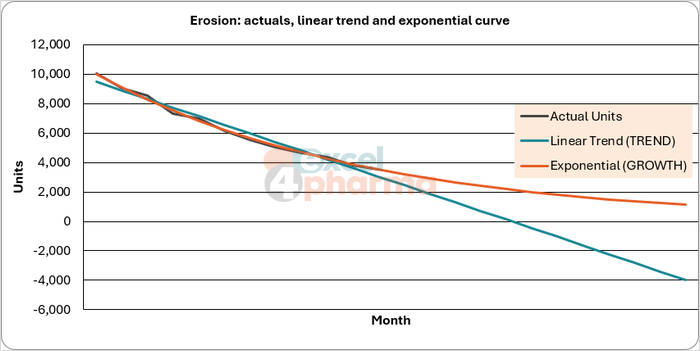
A practical rule follows: GROWTH tends to fit series that change by a percentage, such as early uptake or erosion, and TREND those that change by roughly constant amounts. Plotting the history with both fitted lines on a chart, as in the companion file, shows at a glance which one describes the past better. Neither says anything certain about the future.
Using the result responsibly
A projection from TREND or GROWTH is a statement about the past, not a forecast. It is worth using under three conditions: the history is long enough to show a pattern (a handful of points can fit almost any line), nothing structural is about to change (a new competitor, a price cut, a change in guidelines), and the projection is short compared with the history. Eighteen months of data can reasonably suggest the next six; they cannot tell us much about the next five years.
When the series has a seasonal pattern, neither function captures it: both fit a smooth line through the peaks and troughs. Excel's exponential smoothing functions, such as FORECAST.ETS, are designed for that case.
Common mistakes
- Projecting too far. The further from the data, the more the shape of the chosen curve, not the data, drives the result.
- Using GROWTH on series with zero or negative values. GROWTH returns #NUM! if any known y is zero or negative.
- Forgetting to lock the known ranges. Copied down without dollar signs, the ranges slide, and each row fits a different line.
- Trusting the fit without looking at it. A chart of actuals against the fitted line takes seconds and shows immediately whether a straight line or a curve makes sense.
- Ignoring seasonality. A December peak inside the history pulls the fitted line in ways that have nothing to do with the trend.
Companion file
Illustrative data only. Not a decision tool.For further reading
- TREND function - Microsoft Support
- GROWTH function - Microsoft Support
- FORECAST and FORECAST.LINEAR functions - Microsoft Support